WordPress 7.0: The Complete Guide to Built-in AI, Design Tools, and New Features (2026)
WordPress 7.0 adds built-in AI, a redesigned admin, and new design tools. Explore every major feature, upgrade steps, and community reaction in 2026.
On This Page
If you run a WordPress site, you already know the routine: constant updates, plugin compatibility checks, and hours spent on repetitive content tasks. WordPress 7.0 — the first major WordPress release of 2026 — aims to change that by baking artificial intelligence directly into the platform that powers over 43% of all websites. From a built-in AI client and Abilities API to a fully redesigned admin dashboard, this release is one of the most consequential updates in the project’s two-decade history.
This complete guide breaks down everything new in WordPress 7.0: the AI infrastructure, the revamped editing experience, the design toolkit, the new technical requirements, and the honest community reaction. You will also find a practical upgrade checklist and our industry insights to help you decide whether — and how — to make the move.
What Is WordPress 7.0?
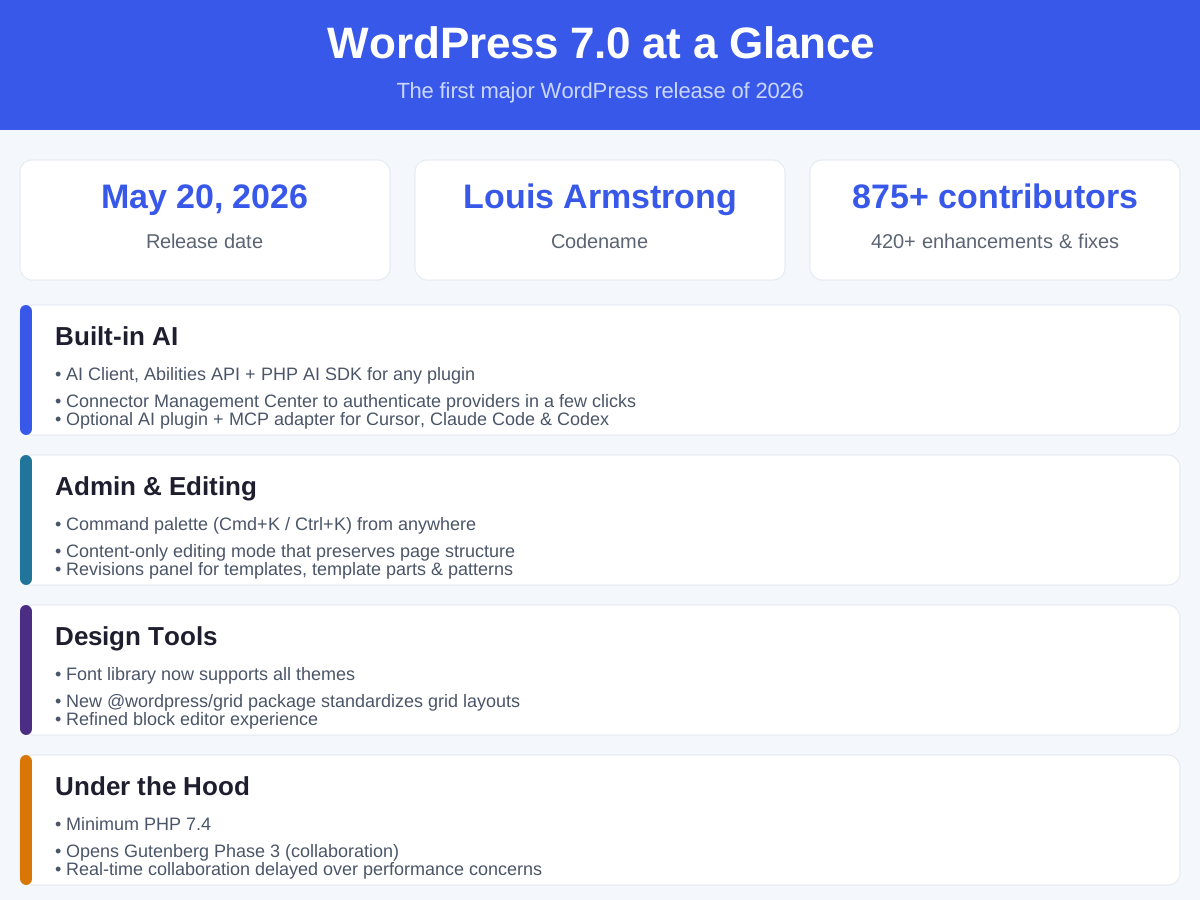
WordPress 7.0 is the first major version of the open-source content management system (CMS) released in 2026. Codenamed “Louis Armstrong” after the legendary jazz musician, it was officially published on May 20, 2026 — roughly six weeks after its original April 9 target. The release was led by Matias Ventura and marks the beginning of Phase 3 of the Gutenberg project, a phase centered on collaboration.
The scale of the release is notable. According to the core team, more than 875 contributors worked on WordPress 7.0, including over 200 first-time participants. Together they shipped more than 420 enhancements and fixes, touching nearly every corner of the platform — from the AI layer to the admin UI, the block editor, fonts, and the underlying grid system.
For everyday site owners, the practical takeaway is simple: WordPress 7.0 is not a cosmetic refresh. It is a platform-level shift that brings AI capabilities into core, modernizes the way you navigate and edit, and lays the groundwork for the next generation of collaborative publishing.
A Quick History: From Blogging Tool to AI-Powered Platform
To understand why WordPress 7.0 matters, it helps to see where the platform came from.
WordPress launched in 2003 as a humble blogging tool. Over two decades it grew into the most popular CMS on the planet, powering everything from personal blogs to large publishers and e-commerce stores. The modern era of WordPress can be traced through the Gutenberg project, which is being rolled out in four planned phases:
| Phase | Focus | Landmark Release |
|---|---|---|
| Phase 1 | Block editor (visual, block-based editing) | WordPress 5.0 (2018) |
| Phase 2 | Full Site Editing (edit your entire site) | WordPress 5.9 (2022) |
| Phase 3 | Collaboration (multi-user workflows) | WordPress 7.0 (2026) |
| Phase 4 | Multilingual (native multi-language support) | Planned |
WordPress 7.0 officially opens Phase 3. That is significant because it signals a long-term bet that WordPress is no longer just a place to publish — it is becoming a collaborative, AI-assisted workspace where teams create and manage content together.
Built-in AI: The Biggest Change in WordPress 7.0
The headline story of WordPress 7.0 is the arrival of native AI infrastructure. For the first time, AI is not something you bolt on with a third-party plugin — it is a first-class capability built into core.
AI Client and Abilities API
At the center of the new architecture are two components: an AI client and an Abilities API. The AI client is the common layer that lets WordPress talk to external AI providers. The Abilities API is the developer-facing toolkit that lets any plugin define and invoke AI-powered “abilities” in a consistent, standardized way.
The practical benefit is huge. Instead of every plugin implementing its own AI integration differently, they can now share one underlying system. That reduces duplication, improves consistency, and makes it far easier for developers to build AI features on top of WordPress.
The Connector Management Center
WordPress 7.0 introduces a unified connector management center, a single place where administrators can authenticate external AI services. The promise is that connecting an AI provider takes just a few clicks — no code required.
This addresses one of the most persistent pain points for non-technical site owners: the complexity of wiring up AI services. By moving provider management into the admin dashboard, WordPress makes AI accessible to people who would never edit a functions.php file.
The Official AI Plugin
Alongside the core infrastructure, WordPress offers an optional official AI plugin that generates images, titles, excerpts, and alt text. The “optional” part matters: the AI features are opt-in, so site owners who do not want AI can simply leave it disabled.
For content teams, this plugin targets the most time-consuming, repetitive parts of publishing — drafting metadata, writing summaries, and producing alt text for accessibility. It is a productivity play first and foremost.
The MCP Adapter: Let AI Agents Manage Your Site
Perhaps the most forward-looking addition is the official MCP (Model Context Protocol) adapter. It enables AI agents and coding assistants such as Cursor, Claude Code, and Codex to read from and write to your website content directly.
This effectively turns WordPress into an environment that AI agents can operate within. A developer or content operator can ask an AI assistant to update a page, fix a heading, or draft a post — and the assistant can perform the action rather than just describing it.
A PHP AI SDK for Every Plugin
Beyond the user-facing features, developers were quick to highlight what may be the most valuable under-the-hood addition: a PHP AI SDK available to any plugin. Paired with the Abilities API, this SDK gives the entire plugin ecosystem a shared foundation for building AI features. As one developer who tested the beta and release candidates put it, the connector UI is the visible gimmick, but the SDK is the feature with real long-term leverage.
Redesigned Admin Dashboard and Editing Experience
WordPress 7.0 also delivers a meaningful overhaul of the day-to-day editing and administration experience.
Command Palette (Cmd+K / Ctrl+K)
One of the most widely praised additions is the command palette. Press Cmd+K on Mac or Ctrl+K on Windows and a searchable command menu appears from anywhere in the interface.
For agencies and power users managing many sites, this is a quiet but transformative improvement. Instead of clicking through nested menus, you can jump to a setting, run an action, or open a post in a couple of keystrokes. GoDaddy described it as an improvement that “runs deep and compounds over time” for builders who operate large numbers of client sites.
Content-Only Editing Mode
A new content-only editing mode lets you edit text and images while preserving the overall page structure and styling. This is designed for the common scenario where a content editor needs to update copy without accidentally breaking a carefully built layout.
It separates the “what the page says” from “how the page looks,” which is a meaningful step toward role-based editing and cleaner editorial workflows.
Revisions Panel for Templates and Patterns
WordPress 7.0 adds a revisions panel that tracks change history for templates, template parts, and block style templates. Previously, version history was strongest for posts and pages; now the same safety net extends to the structural building blocks of a site.
For teams, this means you can review what changed, when, and by whom — and roll back if something goes wrong. It is a small feature with real risk-reduction value.
Font Library for All Themes
The font library, previously limited in scope, now works with all themes. Site owners gain more control over typography without needing custom code or a third-party plugin.
The @wordpress/grid Package
Under the hood, the new @wordpress/grid package standardizes grid-based layouts across the interface. This is more of a developer-facing improvement, but it should result in more consistent, polished admin screens and a stronger foundation for future UI work.
Under the Hood: Requirements and Architecture
WordPress 7.0 is not just a feature release — it also raises the floor on technical requirements and sets a new architectural direction.
Minimum PHP 7.4
The minimum PHP version now climbs to PHP 7.4. This is a deliberate move to drop support for outdated, slower, and less secure PHP versions. For site owners, the implication is clear: before upgrading, confirm your hosting environment runs PHP 7.4 or later. Most reputable hosts already do, but older or neglected servers may need attention first.
Gutenberg Phase 3 Begins
As noted, WordPress 7.0 opens Gutenberg Phase 3, the collaboration phase. The vision is a WordPress where multiple people can work on the same document, leave comments, and coordinate in real time. The infrastructure for this future is beginning to land, even though the most headline-grabbing piece — real-time co-editing — did not make the cut this time around.
Why Real-Time Collaboration Was Delayed
The most anticipated Phase 3 feature, real-time collaborative editing, was pulled from WordPress 7.0 over performance and server-load concerns. The core team made a deliberate trade-off: ship a stable release now rather than risk a flagship feature that could degrade site performance under real-world load.
This is a healthy signal for a platform that powers such a large share of the web. Stability and plugin compatibility were prioritized over shipping a feature that was not ready. The feature is expected to arrive in a future release once the underlying architecture can support it reliably.
Community Reactions: Praise, Concerns, and the Split
The reception to WordPress 7.0 has been genuinely mixed, and the split is instructive.
On the positive side, the release has drawn praise for its overall stability. Technology services provider eXcelisys concluded that WordPress 7.0 “shows outstanding stability, good plugin compatibility, and smooth upgrades for the vast majority of sites.” The command palette earned particular acclaim for its long-term productivity benefits, and the PHP AI SDK was recognized as a genuinely valuable foundation for developers.
The concerns cluster around two areas. First, security: some developers worry about granting AI write access to site content. Second, upgrade reliability: a number of users reported actual page issues after upgrading, including broken site styling.
The most vocal critics object to the AI direction itself. On Hacker News, one long-time user wrote that they have used WordPress for years and simply do not want built-in AI features. Others said they plan to migrate to ClassicPress, a WordPress fork that offers a no-AI, optionally block-based experience. A widely shared sentiment in the r/ProWordPress community summed it up as: “plenty of highlights, mixed feelings on AI, and still missing the features people were waiting for.”
This divide matters because it shows that AI-in-everything is not universally welcome — even in a platform that is otherwise eager to modernize.
AI Write Access: What the Security Concerns Are About
The security worry raised on Reddit and Hacker News deserves a closer look. The concern is not that WordPress itself is insecure — it is that granting AI write access to your content introduces a new attack surface and a new failure mode.
Three practical risks stand out:
- Credential exposure — When you connect an external AI provider, you are handing that service a form of access to your site. If those credentials leak, an attacker could theoretically use the same channel.
- Unreviewed changes — An AI agent with write access can modify content faster than a human can review it. A bad prompt or a hallucinated edit could publish incorrect information before anyone notices.
- Supply-chain trust — AI agents and their models are third-party dependencies. Their behavior can change without notice, which complicates auditing and accountability.
The mitigations are straightforward: keep AI features opt-in, restrict write access to trusted agents only, review AI-generated changes before publishing, and monitor your site’s activity logs. For most small sites the practical risk is low — but the conversation is a useful reminder that “AI-powered” is not automatically “risk-free.”
How to Enable and Use the New AI Features
If you want to try the AI capabilities in WordPress 7.0, here is the practical path.
- Update to WordPress 7.0 and confirm your site is stable.
- Open the connector management center in the admin dashboard and authenticate your preferred AI provider.
- Install the official AI plugin if you want image, title, excerpt, and alt-text generation.
- Try the command palette (Cmd+K / Ctrl+K) to navigate faster while you are at it.
- Start small — use AI to draft excerpts and alt text, then review the output before publishing.
- For developers, explore the Abilities API and PHP AI SDK to build or extend AI-powered features in your own plugins.
Remember that the MCP adapter is a more advanced option aimed at developers and power users who want AI agents such as Cursor or Claude Code to read and write site content directly. Treat it as an automation tool, not a replacement for editorial judgment.
Should You Upgrade to WordPress 7.0?
For most site owners, the answer is yes — but with preparation. WordPress 7.0 has been described as stable and broadly compatible, and the upgrade is available through the admin dashboard or via WP-CLI.
Use this checklist before upgrading:
- Confirm PHP 7.4+ on your hosting environment.
- Back up your site — database and files — before any major update.
- Check plugin compatibility against the official WordPress 7.0 release notes.
- Test on a staging site if you manage a business-critical or complex site.
- Review your theme for compatibility, especially custom or older themes.
- Decide on AI — remember that the official AI features are opt-in.
- Schedule the update during low-traffic hours and monitor the site afterward.
| Consideration | Recommendation |
|---|---|
| Simple blog or brochure site | Upgrade after a backup; risk is low |
| Business or e-commerce site | Test on staging first, then upgrade |
| Heavily customized site | Audit themes/plugins before upgrading |
| Security-sensitive environment | Review AI write-access settings carefully |
WordPress 7.0 vs Alternatives
For teams weighing alternatives, three options come up most often in the WordPress 7.0 conversation.
| Platform | Best For | AI in Core | Block Editor |
|---|---|---|---|
| WordPress 7.0 | General-purpose sites, blogs, e-commerce | Yes (optional) | Yes |
| ClassicPress | Users who want WordPress without AI | No | Optional |
| Drupal | Complex, content-heavy enterprise sites | Limited | No (different approach) |
| Ghost | Writers and publishers focused on content | Some | No |
ClassicPress is a WordPress fork that strips out the block editor and AI, appealing to users who prefer the classic experience. Drupal remains a robust choice for organizations that need a different, more modular administrative architecture. Ghost is a streamlined publishing platform for content-first teams that do not need the full WordPress ecosystem.
None of these is a drop-in replacement for every use case, but each addresses a specific segment of users who feel underserved by WordPress’s current direction.
What WordPress 7.0 Means for Site Owners: Our Industry Insights
In our experience, the single most important thing about WordPress 7.0 is not the AI demo features — it is the architecture. The AI client, the Abilities API, and the PHP AI SDK create a shared foundation that will let the plugin ecosystem build on top of one consistent system instead of a hundred incompatible ones. That is the kind of quiet change that compounds.
Our advice for site owners is to treat AI as a productivity tool, not a set-it-and-forget-it autopilot. Use the official plugin to draft titles, excerpts, and alt text, but always review the output before publishing. AI-generated content still needs a human editor to catch factual errors and preserve your brand voice.
Finally, do not skip the upgrade preparation. The reports of broken styling after upgrading are almost always the result of outdated themes or plugins colliding with a new release. A staging site, a full backup, and ten minutes of plugin compatibility checks will prevent the vast majority of upgrade headaches — and that is true regardless of which major version you are moving to.
Key Takeaways
- WordPress 7.0 is the first major release of 2026, codenamed “Louis Armstrong,” and it opens Gutenberg Phase 3.
- It introduces built-in AI: an AI client, the Abilities API, a connector management center, an optional official AI plugin, and an MCP adapter for AI agents.
- The admin and editing experience gained a command palette, content-only editing mode, an expanded revisions panel, and a universal font library.
- The minimum PHP requirement rises to 7.4, and real-time collaboration was delayed over performance concerns.
- Community reaction is split — praise for stability and the SDK, concerns over AI write access and upgrade issues.
- Most sites can upgrade safely with a backup and staging test; AI features remain opt-in.
Frequently Asked Questions
What is new in WordPress 7.0?
WordPress 7.0 adds native AI infrastructure (an AI client, the Abilities API, a connector management center, an optional official AI plugin, and an MCP adapter), a command palette, a content-only editing mode, an expanded revisions panel, a universal font library, and the new @wordpress/grid package. It also raises the minimum PHP requirement to 7.4.
Is the AI in WordPress 7.0 mandatory?
No. The AI features in WordPress 7.0 are opt-in. The official AI plugin is optional, and you connect external AI providers only if you choose to. Site owners who do not want AI can simply leave those features disabled.
Do I need to know coding to use WordPress 7.0’s AI features?
No. The connector management center is designed so administrators can authenticate AI providers in a few clicks from the dashboard, without writing code. The developer-facing tools, such as the Abilities API and PHP AI SDK, are aimed at plugin developers, not everyday users.
What are the system requirements for WordPress 7.0?
The most notable new requirement is PHP 7.4 or later. Before upgrading, confirm your hosting environment meets this minimum. Most modern, reputable hosts already run PHP 7.4 or higher.
Was real-time collaboration included in WordPress 7.0?
No. Real-time collaborative editing was removed from WordPress 7.0 over performance and server-load concerns. It is expected to arrive in a future release once the underlying infrastructure can support it reliably.
Should I upgrade to WordPress 7.0 right away?
For most sites, yes — after backing up and checking plugin and theme compatibility. If you run a business-critical, e-commerce, or heavily customized site, test on a staging environment first. The release has been described as stable with strong plugin compatibility, but a small number of users have reported upgrade-related styling issues, usually tied to outdated extensions.
Recommended Articles
- What Is WordPress? A Complete Beginner’s Guide — Understand the platform behind the WordPress 7.0 update
- How to Install WordPress in 5 Minutes: Step-by-Step Guide — Get your site running before you upgrade
- WordPress Security: 12 Essential Tips to Protect Your Site — Secure your site as AI write access expands
- How to Speed Up Your WordPress Site: The Ultimate Guide — Optimize performance after upgrading