SaaS Website Builders vs Self-Hosted WordPress: The Complete 2026 Comparison Guide
SaaS website builders vs self-hosted WordPress compared for 2026: real costs, data ownership, security, SEO, and a clear framework for choosing the right one.

En Esta Página
Choosing how to build a website used to feel like a technical decision. In 2026, it is a business decision — and the SaaS website builder vs WordPress question sits right at the center of it. One path rents you a polished, fully managed platform where servers, security, and updates are somebody else’s job. The other hands you the keys to an open-source system you own, control, and maintain yourself.
Most comparison articles pick a side and defend it. That approach leaves you no clearer than when you started. This guide takes a different route: it explains what each model actually is, compares them across the six dimensions that matter (cost, launch speed, ownership, security, SEO, and scale), and finishes with a plain-English decision framework plus real-world scenarios — so you can match the platform to your team, budget, and goals instead of following hype.
What “SaaS” and “Self-Hosted WordPress” Really Mean
Before comparing features, it helps to strip away the marketing language. These two models are not two flavors of the same product. They are built on opposite philosophies of ownership, responsibility, and risk.
SaaS Website Builders: The Rented, Managed Model
SaaS stands for “Software as a Service.” With a SaaS website builder, a company owns the entire technology stack and leases you access to it. You never touch a server, install software, or configure a database. You sign up, pick a template, drag a few blocks around, and your site is live — often within a day.
The platform takes care of hosting, SSL certificates, security patching, backups, and performance optimization. In exchange, you pay a recurring subscription, your design choices are usually constrained to what the builder allows, and your content sits on infrastructure you do not control. Popular examples include Wix, Squarespace, Shopify, and GoDaddy Website Builder.
Self-Hosted WordPress: The Owned, Self-Managed Model
Self-hosted WordPress (often written as WordPress.org) is free, open-source software. You download it, install it on hosting you pay for, and run the whole thing yourself. The source code is public, the database is yours, and nothing is locked behind a vendor’s dashboard.
That freedom is real — but so is the workload. You (or someone you hire) are responsible for choosing hosting, installing and updating the content management system (CMS), selecting a theme, configuring plugins, applying security patches, and keeping backups. You own everything, including the problems.
WordPress.com vs. WordPress.org: The Confusion to Clear Up First
Here is where countless beginners take a wrong turn. “WordPress” refers to two very different products:
| WordPress.com | WordPress.org | |
|---|---|---|
| What it is | A hosted SaaS service | Free, self-hosted software |
| Hosting | Included in the plan | You arrange it yourself |
| Custom themes | Restricted on lower tiers | Unlimited |
| Plugins | Limited to higher-priced plans | Unlimited |
| Ownership | Platform-controlled | Fully yours |
| Cost | Free to $45+/month | Hosting from ~$5/month |
When this article says “self-hosted WordPress,” it always means WordPress.org. If you are paying a monthly fee to a platform that hosts your site and limits your plugins, you are using a SaaS product — even if the word “WordPress” is in its name.
The 2026 Market Reality: Who Actually Runs the Web
A decision this big deserves data. As of October 2026, the numbers tell a nuanced story — and it is not the one most people assume.
| Platform | Type | Share of All Websites | Share of CMS Market |
|---|---|---|---|
| WordPress | Open source | ~40% | ~58.6% |
| Shopify | SaaS (e-commerce) | ~5.4% | ~7.8% |
| Wix | SaaS builder | ~4.2% | ~6.1% |
| Squarespace | SaaS builder | ~2.4% | ~3.6% |
| Webflow | SaaS builder | ~0.8% | ~1.2% |
| Drupal | Open source | ~0.6% | ~0.9% |
WordPress still powers roughly two out of every five websites — more than its ten closest competitors combined. Yet for the first time in two decades, its share is slipping (it peaked near 43.6% in early 2025). Meanwhile, SaaS builders keep growing: Shopify is the fastest-growing major platform, and the global website-builder market is forecast to expand from about $3.6 billion in 2026 to $7.7 billion by 2031.
What does that mean for you? Neither model is “winning” outright. The market is fragmenting because buyers are matching tools to specific jobs — ease of use for simple sites, control for complex ones. Your task is the same.
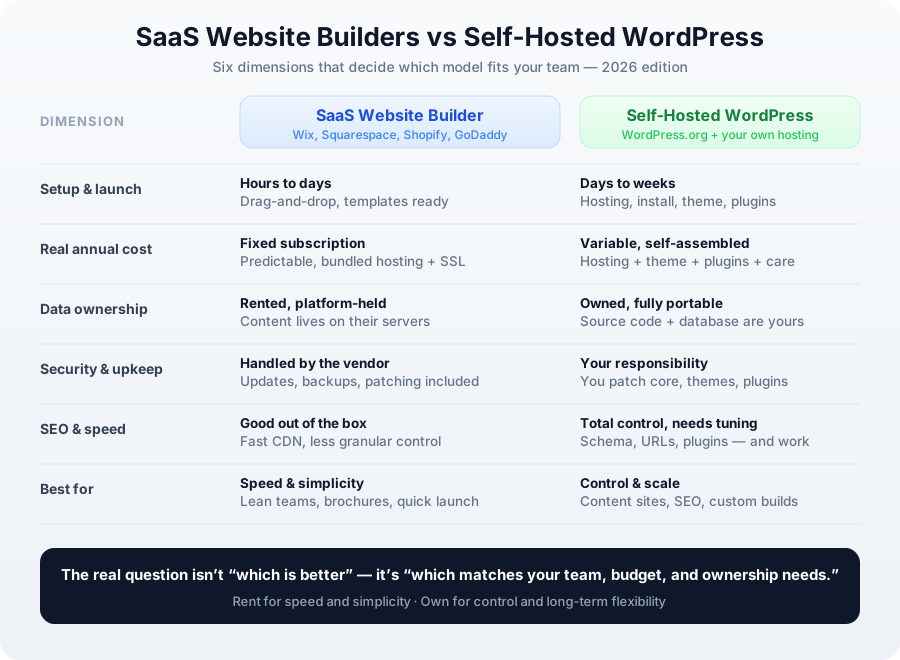
Six Dimensions Compared: SaaS vs Self-Hosted WordPress
Price and features get all the attention, but the decisions that cause regret later involve ownership, maintenance, and scalability. Here is the honest breakdown across the six dimensions that actually matter.
1. Setup, Launch Speed, and Technical Skill
A SaaS builder is the fast lane. Templates, drag-and-drop editors, and pre-wired hosting mean a small team can publish a clean, responsive site in hours to a few days — no code, no configuration, no debugging.
Self-hosted WordPress asks more upfront. You need to buy hosting, install the software, choose and customize a theme, and select plugins. Expect several days for a confident beginner and a few weeks for a polished, feature-rich build. The upside: once it is running, you understand every layer of your own system.
Who wins here: SaaS, decisively — for speed and simplicity.
2. The Real Cost of Ownership
Advertised monthly prices hide the true total. The numbers below reflect realistic 2026 spending for a small-to-midsize content or business site.
| Cost Item | SaaS Builder | Self-Hosted WordPress |
|---|---|---|
| Core plan / hosting | $180–$600/yr | $60–$360/yr |
| Domain | Included or ~$15/yr | ~$10–$20/yr |
| Themes / templates | Included | $0–$80/yr |
| Plugins / apps | Some paid add-ons | $0–$400/yr |
| Security & maintenance | Included | $0–$1,200/yr (if outsourced) |
| Realistic annual total | $180–$650 | $150–$2,000 |
Notice the shape of each column. SaaS costs are predictable and flat — one bill, no surprises. Self-hosted WordPress costs start lower but scale with ambition: premium plugins, a faster host, and professional security add up. If you do the work yourself, WordPress can be the cheapest option on the list. If you outsource everything, it can become the most expensive.
Who wins here: It depends entirely on whether your time or your money is scarcer.
Transparency note: The figures above are illustrative 2026 ranges for a small-to-midsize site. Real costs vary by region, provider, and traffic — always confirm current pricing directly before you budget.
3. Data Ownership, Portability, and Lock-In
With a SaaS builder, your content lives on the vendor’s servers under their terms. Exports usually capture text and images, but the design, layout, and integrations rarely transfer cleanly. Switching platforms can mean rebuilding from scratch — that is lock-in, and it is the single biggest hidden risk of the rental model.
With self-hosted WordPress, you hold the source code, the database, and every asset. You can move hosts in an afternoon, clone the site for staging, hand it to a developer, or migrate to a completely different stack. For businesses operating under data-privacy rules like GDPR, being able to choose where customer data physically resides is not a nice-to-have — it is often a requirement.
Who wins here: Self-hosted WordPress, and it is not close.
4. Security, Maintenance, and Accountability
This is the most misunderstood dimension. SaaS platforms handle patching, monitoring, and backups centrally, which gives them a strong baseline and quick response to new threats. The trade-off: when something breaks, you wait for the vendor — and a platform-wide outage can take your site down with everyone else’s.
Self-hosted WordPress puts security squarely in your hands. Because it is the most popular CMS on earth, it is also the most targeted — security researchers recorded more than 11,000 WordPress vulnerabilities in 2025 alone, a sharp year-over-year rise. That statistic sounds alarming, but context matters: the vast majority of successful attacks exploit outdated plugins, weak passwords, and abandoned themes, not the WordPress core itself. A well-maintained site with automatic updates, a security plugin, and disciplined backups is genuinely hard to breach.
The real question is accountability. On SaaS, the vendor is on the hook. On self-hosted WordPress, you are — unless you deliberately delegate it to a managed host or an agency.
Who wins here: SaaS for zero-effort safety; WordPress for teams willing to own it.
5. SEO, Performance, and Core Web Vitals
Both models can rank well. The difference is how much control you get and how much effort it takes.
SaaS builders deliver solid technical SEO out of the box: clean markup, fast global CDNs, automatic sitemaps, and reasonable Core Web Vitals. The catch is granularity — URL structures, schema markup, and rendering behavior are often fixed or only partly adjustable.
Self-hosted WordPress offers total control: custom permalinks, unlimited schema types, caching and CDN plugins, and the ability to tune every technical signal search engines care about. That power cuts both ways. Only about 45% of WordPress sites pass Core Web Vitals on mobile, largely because of heavy themes and too many plugins. WordPress rewards expertise and punishes neglect.
Who wins here: Toss-up. SaaS for easy competence; WordPress for ceiling-setting control.
6. Flexibility, Integrations, and Long-Term Scaling
A SaaS builder covers the needs of most small businesses — contact forms, galleries, blogs, basic stores, and analytics — through a curated set of features. It is excellent until you need something the platform has not built yet. Then you wait, or you work around it.
Self-hosted WordPress runs on an ecosystem of tens of thousands of plugins and themes, plus an open API. Membership sites, multilingual storefronts, custom post types, CRM integrations, headless setups — if you can describe it, someone has probably built it, or you can build it. The cost is complexity: every plugin you add is another thing to maintain and another potential conflict.
Who wins here: WordPress, for anyone with growth plans the platform cannot predict.
Real-Life Scenario: Two Businesses, Two Right Answers
Abstract comparisons only go so far. Consider two companies we have seen navigate this exact choice.
A regional accounting firm needed a credibility site with five pages, a blog, and a contact form. They had no IT staff and a marketing budget measured in hundreds of dollars a year. They chose a SaaS builder, launched in three days, and have not touched a server since. The subscription is transparent, and their site has never gone down. For them, self-hosting would have been expensive overkill.
A membership publisher with 20,000 subscribers needed gated content, a custom paywall, multilingual pages, and precise control over crawl budget. A SaaS builder hit its limits within weeks. They moved to self-hosted WordPress with a managed host, a premium theme, and a small plugin stack. Their costs are higher and someone owns updates — but they gained a site that bends to their business instead of the reverse.
Our industry insight: the most expensive decision is not choosing “the wrong platform.” It is choosing a platform that cannot grow with you and then paying twice — once to build on it and again to migrate off it. When in doubt, optimize for the next two years of your plans, not just this month’s launch.
Five Myths That Still Mislead Buyers in 2026
- “A SaaS site is always cheaper.” Only if your needs stay simple. Add e-commerce, memberships, or multilingual content, and SaaS pricing climbs fast — sometimes past a comparable WordPress build.
- “Owning your code is always better.” Ownership is only an advantage if you can actually use it. Source code you never maintain is a liability, not an asset.
- “WordPress is less secure.” The core is maintained aggressively. The real risks are neglect and bad plugins — both fixable.
- “SaaS platforms can’t do SEO.” They handle the fundamentals well. What they lack is fine-grained control, which most small sites never need.
- “You can always migrate later.” Technically true, practically painful. Exporting content is easy; recreating design, structure, and integrations rarely is.
Which Should You Choose? A Clear Decision Framework
Stop comparing feature lists and answer one question honestly: what does your team have more of — time or money?
Choose a SaaS Website Builder If…
- You have no dedicated technical staff and no appetite to hire one.
- You want predictable, flat costs with no surprise line items.
- Your core needs are brand presence, portfolios, blogs, or simple booking and inquiry forms.
- Launch speed matters more than ultimate flexibility.
- You are comfortable renting rather than owning your platform.
Choose Self-Hosted WordPress If…
- You have technical skills in-house or a reliable developer or agency on call.
- You need deep customization, integrations, or system-to-system connectivity.
- SEO granularity, performance tuning, and content architecture are strategic priorities.
- Data ownership, portability, and compliance are non-negotiable.
- You are planning to grow and evolve the site for years, not months.
A practical middle path also exists: managed WordPress hosting. You still own your site and data, but the host handles updates, security, and speed — blending SaaS convenience with WordPress ownership. It is often the best of both worlds for small teams with high ambitions.
Frequently Asked Questions
Is self-hosted WordPress free? The software is free, but running it is not. Expect hosting, a domain, and optional premium themes or plugins. Realistic all-in costs range from roughly $150 to $2,000 per year depending on how much you do yourself.
Can a SaaS website builder rank on Google? Yes. SaaS platforms handle technical SEO well, and many rank strongly. You simply have less control over fine details like URL structure and schema than you would on WordPress.
Which is more secure? Neither is inherently “safe.” SaaS offloads security to the vendor; self-hosted WordPress makes it your job. A diligently maintained WordPress site with automatic updates, backups, and a security plugin is very secure.
Can I move from a SaaS builder to WordPress later? You can export your content, but design and integrations usually must be rebuilt. Plan for a real project, not a quick switch — which is exactly why choosing well up front matters.
Is WordPress really declining? Its share is easing from a record high, not collapsing. WordPress still powers about 40% of all websites and remains the default choice for content-heavy and fully custom sites.
Do I need to know how to code to run self-hosted WordPress? No, but expecting zero technical contact is unrealistic. Modern WordPress is largely visual, yet installation, hosting, and plugin upkeep still require comfort with a dashboard and settings — or a partner who has it. If you want to avoid that entirely, choose managed WordPress hosting or a SaaS builder.
Which model is better for an online store? For a small catalog with fast setup, SaaS e-commerce is the smoother path. For content-rich commerce with custom logic, memberships, or complex SEO needs, self-hosted WordPress paired with WooCommerce — which holds roughly 29% of the e-commerce market — offers far more room to grow.
How long does migrating between the two really take? Exporting content takes hours, but rebuilding design, structure, and integrations is the real work. Budget days for a simple site and several weeks for a complex one. That effort is exactly why the first choice deserves careful thought.
Final Thoughts
The SaaS website builder vs self-hosted WordPress debate has no universal winner — only a right fit for your situation. SaaS wins on speed, simplicity, and predictable costs; self-hosted WordPress wins on ownership, flexibility, and long-term control. The teams that thrive are not the ones that picked the “better” platform. They are the ones that matched the tool to their team, budget, and ambition — and stayed honest about which of those they actually have.
Start by naming your real constraint. If it is time, rent. If it is control, own. Then confirm the choice can survive your next two years of plans, and you will avoid the one mistake that genuinely costs money: outgrowing your platform and paying to start over.
Recommended Articles
- What Is WordPress? A Complete Beginner’s Guide (2026) — New to WordPress? Start with the fundamentals before choosing a platform
- WordPress vs Shopify: The Complete Guide to Building Your Website (2026) — See how WordPress compares with another hosted platform
- How to Install WordPress in 5 Minutes: Step-by-Step Guide (2026) — Ready to self-host? Get your site online fast
- WordPress Security: 12 Essential Tips to Protect Your Site — Lock down your self-hosted site from day one